
- Published on
How to control when GitHub and GitLab PR/MR cards post to Slack
- Authors
- Name
- Maruan
Not every GitHub pull request or GitLab merge request should ping Slack the second someone opens it. Draft work-in-progress, Dependabot bumps, and CI-only pushes create noise even when you already use one updating card per PR/MR.
MergeMe puts those controls in Routing → Preferences: workspace-wide settings that apply to every mapped GitHub.com, GitLab.com, and self-hosted GitLab project. You decide which git usernames to ignore, when the first Slack card goes out, and how the card title looks.
The problem: cards appear too early (or bots never stop)
Two common complaints after teams connect git to Slack:
- A draft PR or WIP merge request posts to the channel before the author wants review
- Bot accounts (Dependabot, Renovate, Cursor, internal automation) open PRs and MRs that humans never intend to review in Slack
Channel routing decides where a card goes. Preferences decide whether and when it appears at all.
Without timing controls, every mapped open event can trigger a card. Without an exclude list, every bot username is treated like a teammate.
Workspace preferences at a glance
Open Routing → Preferences in the dashboard. Settings apply to the whole workspace across GitHub and GitLab:
| Setting | What it does | Default |
|---|---|---|
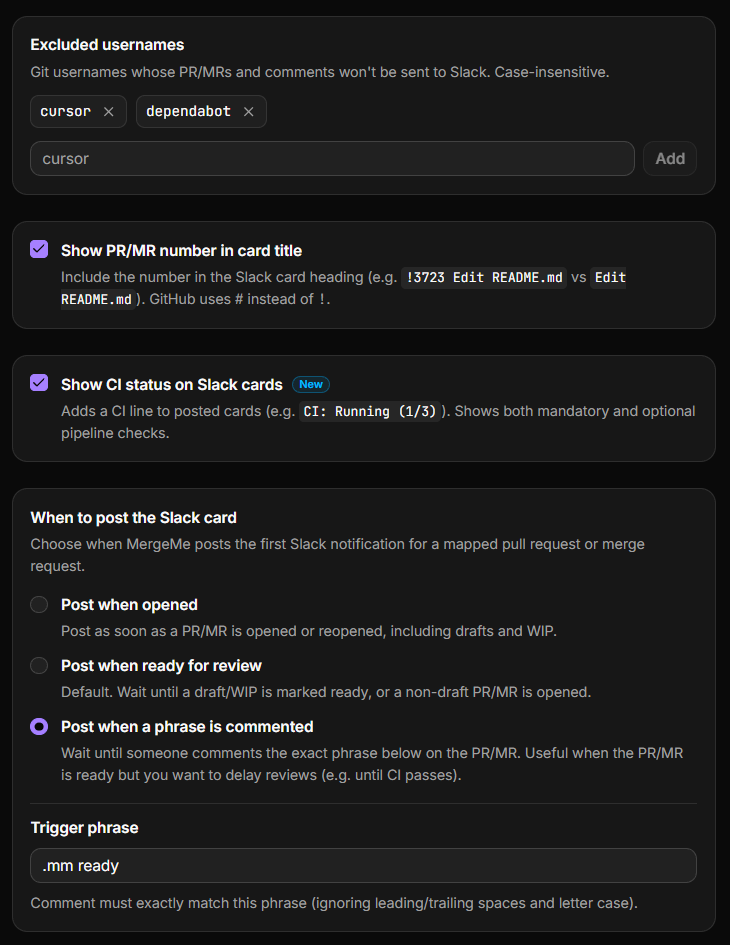
| Excluded usernames | Blocklist git accounts whose PRs/MRs and comments never post to Slack | Empty |
| When to post the Slack card | Controls the first card for each PR/MR | Post when ready for review |
| Show PR/MR number in card title | Prefix the heading with #42 (GitHub) or !3723 (GitLab) | On |
| Show CI status on Slack cards | Optional rollup line for checks and pipelines | Off |
For CI setup, see routing preferences (the CI line updates the existing card in place and does not add extra messages).
Exclude bot and automation accounts
Add git usernames to Excluded usernames when you never want their activity in Slack. Matching is case-insensitive. You can exclude up to 50 usernames per workspace.
Common entries:
dependabotanddependabot[bot]on GitHubrenovateandrenovate[bot]cursoror other internal bots that open automated PRs- Service accounts that push docs-only changes you do not review in Slack
Excluded users are filtered from both new cards and comment thread replies. If someone is excluded, their PRs, MRs, and comments are silently dropped for Slack purposes. Nothing errors; the channel just stays quiet.
Post GitHub and GitLab PR/MR cards only when your team is ready withrouting preferences from MergeMe
Start freeWhen to post the first Slack card
When to post the Slack card controls the first notification for each pull request or merge request. After the card exists, status updates (approved, merged, and so on) still edit that card in place.
Three modes:
Post when opened
Posts as soon as the PR or MR is opened or reopened, including drafts and work-in-progress. Use this when your team wants maximum visibility and reviews drafts in Slack.
Post when ready for review (default)
Waits until a draft is marked ready, or a standard PR/MR is opened without draft status. This is the default for new workspaces. It cuts noise from half-finished work without requiring a manual step on every change.
Post when a phrase is commented
Waits until someone leaves a PR or MR comment that exactly matches your configured phrase (case-insensitive, leading and trailing spaces ignored). Useful when authors want CI to finish or a self-review pass before the channel sees the request.
Example workflow:
- Author opens a PR on GitHub or an MR on GitLab.
- CI runs. The author reviews their own diff.
- Author comments
.mm ready(or whatever phrase you configure). - MergeMe posts the Slack card and evaluates label routing at that moment.
Label rules run when the card is first posted, not when the PR or MR is opened. If you use phrase mode, a bug label added after the trigger comment will not retroactively change the destination channel.
Show PR/MR number in the card title
When enabled (the default), card headings include the reference number:
- GitHub:
#18 Add CI status to Slack cards - GitLab:
!3723 Edit README
Turn this off if your team prefers title-only headings. The number is still available on the git host; this only affects the Slack card text.
How preferences interact with channel routing
Preferences are workspace-wide. Channel mappings are per repository or project.
Typical order for a new event:
- Is the project mapped to a Slack channel? If not, nothing posts.
- Is the author on the excluded list? If yes, nothing posts.
- Does the PR/MR satisfy the when to post rule? If not yet, MergeMe waits.
- When the card is first posted, label routing on that mapping picks the channel.
- Later status changes and comments update the existing card or its thread.
Set up channel mappings first, then tune preferences.
Official Slack apps vs MergeMe preferences
| Official GitHub / GitLab Slack apps | MergeMe | |
|---|---|---|
| Exclude bot usernames | No | Yes, up to 50 per workspace |
| Delay until ready for review | No | Yes, default mode |
| Gate on a comment phrase | No | Yes |
| Control applies across GitHub + GitLab | N/A | Yes, one preferences page |
| Messages per PR/MR | New message per event | One card, updated in place |
FAQ
Where do I change when Slack cards are posted?
Routing → Preferences in the MergeMe dashboard. The setting applies to every mapped GitHub repository and GitLab project in the workspace.
What is the default trigger for new cards?
Post when ready for review. Draft PRs and WIP merge requests do not post until they leave draft status or are marked ready.
How does phrase comment mode work?
Pick Post when a phrase is commented and set a trigger phrase (for example .mm ready). MergeMe posts the first Slack card only when a PR or MR comment exactly matches that phrase, ignoring case and extra spaces.
Do excluded usernames block comments too?
Yes. Excluded git usernames do not trigger new cards or thread replies on existing cards.
Does changing preferences affect old Slack messages?
No. Preferences apply to future events. Existing cards are not backfilled or deleted when you change a setting.
Do preferences work with self-hosted GitLab?
Yes. Excluded usernames and post triggers apply the same way. You still need a channel mapping with the project ID and webhook configured.
How does this relate to CI status on cards?
Separate toggle under the same Preferences page. Show CI status on Slack cards is off by default. When enabled, a CI rollup line appears on the card and updates in place. See routing preferences for GitHub and GitLab requirements.
Get started
- Routing preferences docs: excluded usernames, post triggers, and CI toggle
- Channel routing blog post: map repos before tuning preferences
- Start free: Hobby plan includes preferences on one channel mapping
Post to Slack when the work is actually ready for review, not when someone saves a draft.