- Published on
How to stop GitHub and GitLab Slack notification spam
- Authors

- Name
- Maruan
Your #engineering channel looked useful on day one. Six months later it is a firehose: every GitHub pull request push, every GitLab merge request approval, every pipeline rerun becomes another Slack message. People mute the channel. Real review requests get buried.
That is notification spam. The official GitHub and GitLab Slack apps were built around a simple model: one new Slack message per event. On an active repo, a single PR or MR can generate a dozen notifications before it merges.
MergeMe takes a different approach: one updating card per pull request or merge request, edited in place from opened through approved to merged. Comments land as thread replies on that same card. It works for GitHub.com, GitLab.com, and self-hosted GitLab in one workspace.
Why Slack channels fill up with PR and MR noise
The official apps notify you about real activity. The problem is the delivery model.
On a busy GitHub repo, a single pull request might trigger separate Slack messages when someone:
- Opens or reopens the PR
- Pushes new commits
- Requests review or approves
- Leaves a comment
- Merges or closes
GitLab merge requests follow the same pattern: opened, pushed, commented, approved, merged. Each event can become its own message in Slack.
That creates predictable pain:
- Reviewers cannot tell which requests still need attention
- Comment threads split across unrelated messages instead of one conversation
- Teams mute the channel and miss the one review that actually matters
- @mentions from git show up as plain text, so the right person never gets pinged
If you only use one git host today, the spam pattern is the same on both. Mixed teams with a GitHub frontend and a GitLab backend get hit twice as hard when everything lands in one channel.
One card per PR/MR, updated in place
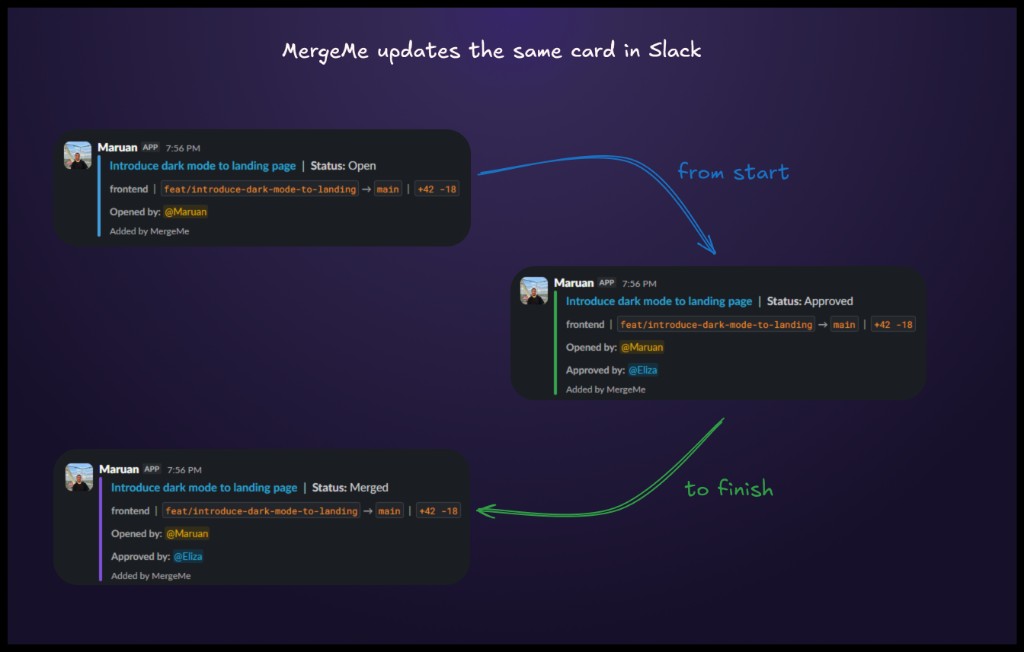
MergeMe posts one Slack message when a mapped pull request or merge request first qualifies for notification. After that, status changes edit that message instead of posting new ones.
The same card tracks the whole lifecycle:
- Status: Open when the PR or MR is ready for review
- Status: Approved when a reviewer approves (with approver name on the card)
- Status: Merged when it lands on the target branch
Branches, diff stats, and reviewer attribution update on the card as events arrive. Review comments post as thread replies underneath, not as standalone channel messages.
A typical card while work is in progress looks like this:
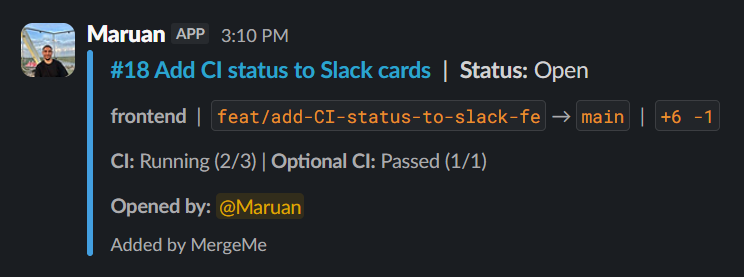
After approval, the same message updates:
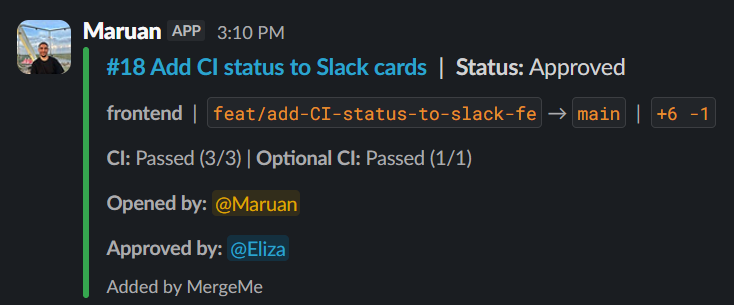
When the PR or MR merges, the card reflects the final state:
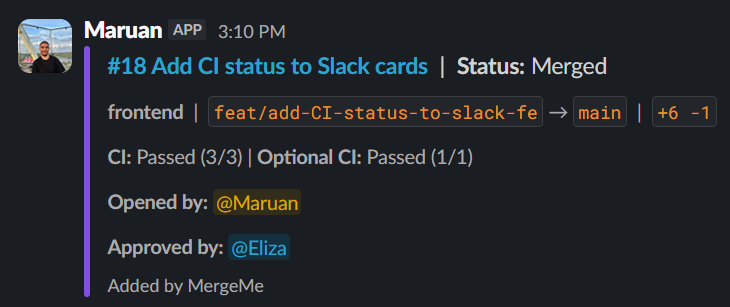
Nothing else in the channel moves. The card at the top of the thread is still the card at the bottom.
Replace notification spam with one updating Slack card per PR/MR fromMergeMe
Start freeWhat else keeps Slack usable
A single updating card solves the biggest source of noise. Teams usually combine it with a few more controls:
| Problem | MergeMe feature | Where to configure |
|---|---|---|
| Every repo posts to one channel | Per-repo channel routing | Routing → Channel mappings |
| Bug fixes and docs need different audiences | Label routing overrides | On each channel mapping row |
| @mentions do not ping anyone | User mapping to Slack | Routing → User mappings |
| Bots and automation flood the channel | Excluded usernames | Routing → Preferences |
| Cards appear before the author is ready | When to post trigger | Routing → Preferences |
For setup walkthroughs, see how to route GitHub repos and GitLab projects to Slack channels and how to fix broken @mentions in Slack. For notification timing and bot filters, see control when PR/MR cards post to Slack.
Problem-first guides on the main site: stop GitLab Slack notification spam and GitHub PR notifications without spam.
Official Slack apps vs MergeMe
| Official GitHub / GitLab Slack apps | MergeMe | |
|---|---|---|
| Messages per PR/MR | New message for every event | One card, updated in place |
| Review comments | Often separate messages | Thread replies on the card |
| Channel noise on active repos | High | Low: one card per PR/MR |
| Per-repo channel routing | No | Yes, via channel mappings |
| GitHub + GitLab in one workspace | No | Yes |
| Self-hosted GitLab | Limited / varies | Yes, via manual webhook |
The official apps are fine for a single quiet repo. Once you have multiple codebases, active review traffic, or both GitHub and GitLab, the per-event model is what creates spam.
For deeper comparisons, see official GitHub Slack app vs MergeMe and official GitLab Slack app vs MergeMe.
How to switch without disrupting the team
- Sign in and create a workspace.
- Connect Slack and your git host(s): GitHub, GitLab.com, or self-hosted GitLab.
- Add channel mappings for the repos or projects you want in Slack.
- Optionally add user mappings so @mentions resolve, and tune preferences for when the first card posts.
Start with one channel and one or two repos. MergeMe only posts for mapped projects, so unmapped repos stay silent.
FAQ
Why does the official GitHub or GitLab Slack app spam my channel?
Because it posts a new Slack message for every webhook event on a pull request or merge request. Opens, pushes, comments, approvals, and merges each become separate messages. Active repos generate a lot of events.
How is MergeMe different from the official Slack apps?
MergeMe keeps one updating card per PR/MR. Status changes edit that card in place. Review comments post as thread replies on the same message instead of new channel posts.
Does MergeMe support both GitHub and GitLab?
Yes. Connect GitHub.com, GitLab.com, and self-hosted GitLab in the same workspace. Each channel mapping is tagged by git source.
How many Slack messages does MergeMe send per pull request or merge request?
One main card per PR or MR. Later events update it. Comments go to the thread on that card, not as new top-level messages.
Can I route different repos to different Slack channels?
Yes. Channel mappings send each GitHub repository or GitLab project to a default Slack channel. Label routing can override the destination when the PR or MR is first posted.
Does MergeMe read my source code?
No. MergeMe processes webhook payloads (PR/MR metadata, labels, reviewers, comments, and optional CI status). It does not clone or read private repositories.
How much does MergeMe cost?
The Hobby plan is free and includes 1 channel mapping and 5 user mappings. The Team plan starts from £5 per developer seat per month (10-seat minimum) with unlimited channel mappings and multi-git. See pricing.
Get started
- Documentation: install guides, routing, and webhooks
- Channel routing blog post: map repos and projects to Slack channels
- Start free: connect GitHub, GitLab, and Slack in about five minutes
One card per pull request or merge request. Your channel stays readable.