- Published on
How to show GitHub and GitLab CI status on Slack PR and MR cards
- Authors

- Name
- Maruan
Reviewers often open a GitHub pull request or GitLab merge request in Slack, then bounce to GitHub Actions or GitLab pipelines to see whether CI is green. That extra tab is easy to miss when the channel is already noisy.
MergeMe can put a CI rollup line on the same Slack card that already tracks the PR or MR. The line updates in place as checks and pipelines run. It works for GitHub.com, GitLab.com, and self-hosted GitLab in one workspace.
The problem: CI lives in a different tab
Official GitHub and GitLab Slack apps post a new message for every event. Pipeline and check updates often land as yet more messages, or they never show up next to the review at all.
That creates two bad options:
- Reviewers approve before CI finishes, then watch the pipeline fail
- Reviewers ignore Slack and live in the git host instead
Neither is great for code review in Slack. You want one place that answers: is this request open, who opened it, and is CI still running?
One updating card, plus a CI line
MergeMe already posts one updating card per pull request or merge request. Status changes (opened, approved, merged, closed) edit that message. Comments go to the thread.
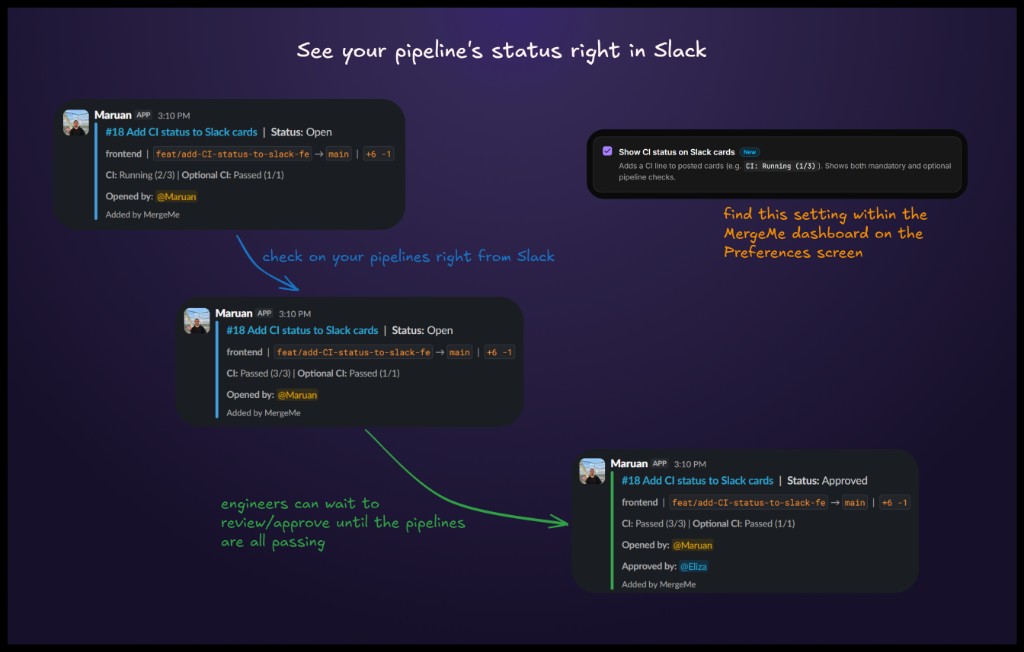
When Show CI status on Slack cards is on, MergeMe adds a rollup line to that same card, for example:
CI: Running (2/3)CI: Passed (3/3)Optional CI: Passed (1/1)when non-blocking checks exist
The line is display-only. It does not change review status, card colour, or thread behaviour, and it does not post extra Slack messages for every pipeline tick.
If CI data is missing (no pipeline yet, a stale commit, or missing GitHub permissions), MergeMe hides the row instead of showing an error.
How to turn it on
The toggle lives under Routing → Preferences. It applies to every mapped GitHub repo and GitLab project in the workspace.
- Connect Slack and at least one git source (GitHub setup, GitLab.com setup, or self-hosted GitLab setup).
- Add a channel mapping so events have a Slack destination.
- Open Routing → Preferences.
- Enable Show CI status on Slack cards.
- Open or update a PR/MR so a check or pipeline webhook can populate the line.
Full reference: routing preferences.
See GitHub and GitLab CI status on the same Slack card withone updating PR/MR message from MergeMe
Start freeWhat each git host needs
| Git source | What MergeMe needs | Then |
|---|---|---|
| GitHub.com | Checks: Read and Commit statuses: Read on the GitHub App | Enable the preference. GitHub may prompt you to approve these after an app update. If you skip the prompt, cards keep working without the CI line. |
| GitLab.com | Pipeline events on mapped projects (registered automatically) | Enable the preference, then open or update an MR so a pipeline webhook can populate the line. |
| GitLab self-hosted | Pipeline events on the group or project webhook, in addition to merge request and comment events | Enable the preference after the webhook includes pipeline events. |
GitHub Actions uses check runs. Older CI (Jenkins and similar) often uses commit statuses. MergeMe reads both.
A mixed team can show CI for a GitHub frontend PR and a GitLab backend MR in the same Slack workspace. Each mapping still posts to its own channel.
Official Slack apps vs MergeMe CI on the card
| Official GitHub / GitLab Slack apps | MergeMe | |
|---|---|---|
| Messages per PR/MR | New message for every event | One card, updated in place |
| CI next to the review | Not on the same updating card | Optional rollup line (CI: Running (2/3)) |
| Extra Slack noise from CI | Often more messages, or no status at all | No extra messages; the line edits in place |
| GitHub + GitLab in one workspace | No | Yes |
CI status is included on the Hobby plan (free: 1 channel mapping, 5 user mappings). See pricing.
FAQ
Does MergeMe show CI status on Slack cards?
Yes, when you enable Show CI status on Slack cards under Routing → Preferences. MergeMe adds a rollup line for GitHub checks and GitLab pipelines, for example CI: Running (2/5).
Does CI status post a new Slack message every time a job finishes?
No. The CI line updates the existing card. MergeMe does not post a separate Slack message or thread reply for each pipeline or check event.
Does MergeMe support both GitHub and GitLab in one workspace?
Yes. Connect GitHub.com, GitLab.com, and self-hosted GitLab in the same workspace. The CI preference is workspace-wide; each channel mapping still routes that repo or project to its Slack channel.
Does this work with self-hosted GitLab?
Yes. Enable Pipeline events on the webhook (in addition to merge request and comment events), then turn on the preference. See the self-hosted GitLab setup guide.
What if GitHub asks me to approve extra permissions?
Approve Checks: Read and Commit statuses: Read if you want the CI line. If you skip that prompt, pull request cards keep working; the CI line just will not appear. MergeMe does not request write access to checks or source code.
Does MergeMe read my source code?
No. MergeMe processes webhook payloads (PR/MR metadata, comments, and CI check or pipeline status). It cannot and does not clone repositories.
Get started
- Routing preferences: CI toggle, when to post, and excluded usernames
- GitHub setup and GitLab.com setup
- Start free: Hobby includes CI status on Slack cards
Turn the line on, wait until CI: Passed, then review. The card is already in Slack.