
- Published on
How to fix broken @mentions in Slack for GitHub and GitLab code review
- Authors

- Name
- Maruan
You open Slack and see @johndoe requested changes, but nothing happens. No notification, no highlight, just plain text that looks like a mention and does nothing like one. If your team reviews GitHub pull requests and GitLab merge requests through Slack, broken @mentions are one of the most common complaints.
User mapping fixes this. MergeMe links each GitHub or GitLab username to a real Slack user, so mentions in PR/MR notifications and comments become actual Slack @mentions instead of dead text.
Why @mentions break in the first place
Slack has no idea that johndoe on GitHub and John Doe in your Slack workspace are the same person. Usernames rarely match:
- GitHub/GitLab usernames are often
firstname-lastnameor handles picked years ago - Slack display names are usually real names or
@firstname - Some people have completely different handles on each platform
The official GitHub and GitLab Slack apps post the raw username as plain text. It looks like a mention in the message, but Slack never resolves it, so the person is never notified and never sees a highlighted mention in their sidebar.
What user mapping actually does
A user mapping is a link between one git identity and one Slack user:
| You map | To |
|---|---|
A GitHub username (e.g. maruan-dev) | A Slack user (e.g. Maruan, maruan@mergeme.dev) |
A GitLab username (e.g. eliza-dev) | A Slack user (e.g. Eliza, eliza@mergeme.dev) |
Once mapped, MergeMe resolves that person everywhere a PR/MR event references them:
- Opened by on the main card
- Approved by / Requested changes on status updates
- @mentions inside review comments, which post as thread replies on the existing Slack card
Unmapped users still show up, just as plain text, so nothing breaks if a mapping is missing.
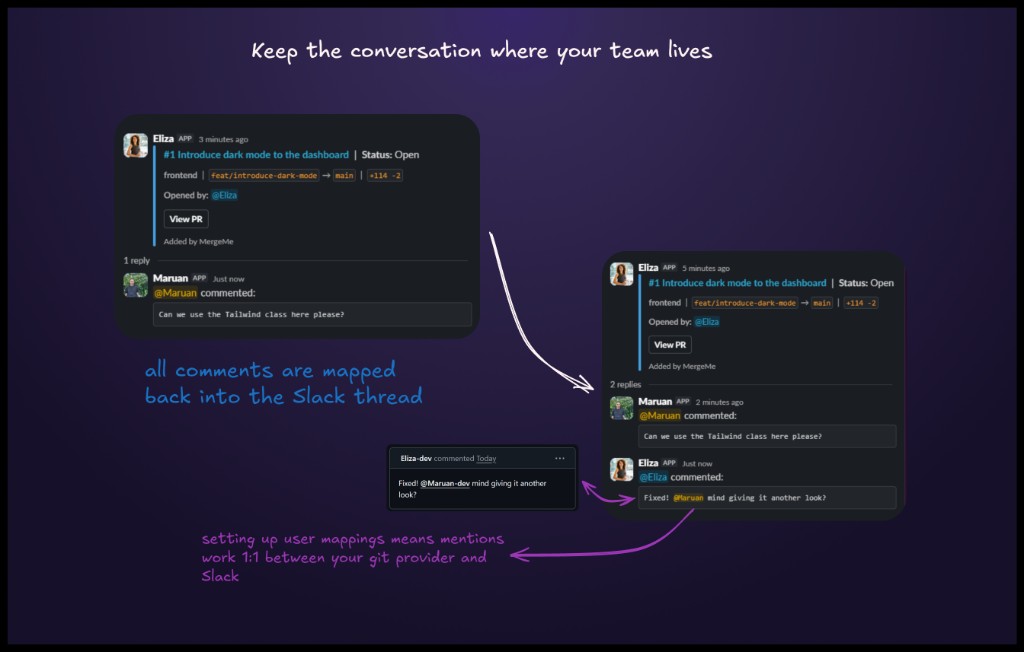
Comments stay in one thread, not scattered messages
This is the part official apps get wrong. Every new comment from GitHub or GitLab becomes a separate Slack message with the official apps, so a five-comment review turns into five unrelated notifications with no connection to the original PR/MR.
With MergeMe, every comment on a pull request or merge request posts as a thread reply on the single updating card for that PR/MR. Reviewers see the whole conversation in one place, and mapped users get a real @mention inside that thread instead of a plain-text handle.
Give every reviewer a real Slack @mention withuser mapping from MergeMe
Start freeHow to set up user mappings
User mappings work the same way for GitHub, GitLab.com, and self-hosted GitLab. You need Slack connected first, plus at least one git source.
- Go to Routing → User mappings in the dashboard.
- Pick a git username from the dropdown (populated from your GitHub App installation or GitLab OAuth connection), or enter one manually for self-hosted GitLab.
- Select the matching Slack user from your connected workspace.
- Save. New mappings apply to future events immediately; nothing is backfilled on old messages.
Repeat for each teammate you want properly mentioned. Each mapping is tagged by git source, so the same person can have separate GitHub and GitLab mappings pointing to the same Slack account.
For channel setup first, see how to route GitHub repos and GitLab projects to Slack channels - user mappings only take effect on projects that already have a channel mapping.
What happens without a mapping
Nothing breaks. If MergeMe does not have a mapping for a username, it posts the username as plain text instead of a Slack mention. No error, no dropped notification, just a slightly less useful message. That makes user mapping safe to roll out gradually, team member by team member, instead of needing everyone mapped on day one.
Official Slack apps vs MergeMe mention mapping
| Official GitHub / GitLab Slack apps | MergeMe | |
|---|---|---|
| @mentions in notifications | Plain text, never resolved | Real Slack @mentions via user mapping |
| Review comments | New message per comment | Thread replies on one card |
| GitHub + GitLab in one workspace | No | Yes, mappings tagged by git source |
| Self-hosted GitLab usernames | Limited / varies | Manual entry supported |
FAQ
How do user mappings work?
When MergeMe receives a webhook event, it checks the author's GitHub or GitLab username against your saved mappings. If a match exists, MergeMe posts a real Slack @mention for that person. Without a mapping, the username appears as plain text and nothing else changes.
What happens if a GitHub or GitLab user isn't mapped?
The notification still sends normally. The username just appears as plain text (for example @johndoe) instead of a clickable Slack mention. There is no error and no dropped event.
Do I need a channel mapping before user mappings work?
Yes, at runtime. You can create a user mapping any time Slack and a git source are connected, but MergeMe only processes events for projects that already have a channel mapping. Set up channel routing first, then add user mappings for that project's contributors.
Does this work with self-hosted GitLab?
Yes. Cloud GitHub and GitLab usernames come from a dropdown populated by your connection, and self-hosted GitLab usernames can be entered manually since there is no OAuth list to pull from.
Can one person have both a GitHub and a GitLab mapping?
Yes. Mappings are tagged by git source, so the same Slack user can be linked to a GitHub username and a GitLab username separately. This is common on mixed teams where the frontend lives on GitHub and the backend lives on GitLab.
How many user mappings do I get for free?
The Hobby plan includes 5 user mappings for free. The Team plan (from £5 per developer seat per month, 10-seat minimum) raises that cap alongside unlimited channel mappings. See pricing.
Get started
- Documentation: install guides, routing, and webhooks
- Routing overview: channel mappings, user mappings, and preferences
- Start free: connect GitHub, GitLab, and Slack in about five minutes
Map your team once, and every future pull request or merge request notifies the right person by name, in the right thread.