- Published on
How to route GitHub PRs and GitLab MRs to Slack channels by label
- Authors

- Name
- Maruan
Per-repo routing gets every GitHub pull request and GitLab merge request into the channel its team watches. Then a security fix lands in #frontend-reviews where the security team never looks, or a docs change pings twelve backend engineers who do not care.
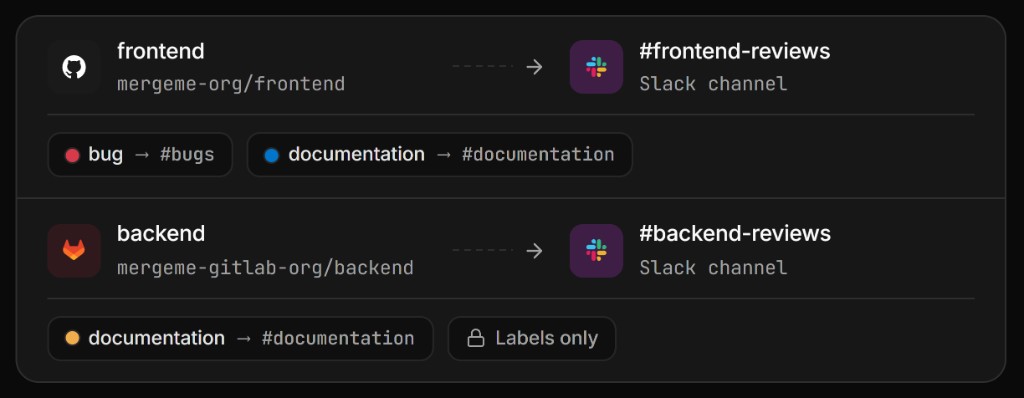
Label routing solves that. In MergeMe, each channel mapping has a default Slack channel, and up to five label rules can override it. A PR or MR labelled security goes to #security-reviews; one labelled documentation goes to #docs; everything else uses the repo default. It works the same for GitHub.com, GitLab.com, and self-hosted GitLab, and the card is still one updating message per PR/MR.
Why per-repo routing is not always enough
Channel mappings answer "which team owns this codebase?". Labels answer a different question: "who needs to see this change?". Those often differ.
Typical cases where the repo default is wrong:
- Security fixes need security reviewers regardless of which repo they touch
- Bug fixes across several repos are easier to triage from one
#bugschannel - Documentation changes need tech writers, not the whole squad
- Dependency bumps belong in a low-traffic channel, not the main review queue
The official GitHub and GitLab Slack apps cannot route by repository, let alone by label, and they post a new message for every event. Teams end up with one noisy channel where the important review is message 40 of the day.
How label routing works in MergeMe
Every channel mapping has:
- A default Slack channel used when no rule matches
- Up to 5 label rules, each pairing one label with one Slack channel
- An optional Prevent default posting switch (shown as a Labels only badge on the row)
When MergeMe creates the Slack card for a PR or MR, it checks the labels present at that moment against the rules, top to bottom:
Mapping: acme/web-app (GitHub)  default → #frontend-reviews
  1. security       → #security-reviews
  2. bug            → #bugs
  3. documentation  → #docs

PR labels: [bug, security]        → #security-reviews  (rule 1 wins)
PR labels: [documentation]        → #docs
PR labels: [enhancement]          → #frontend-reviews  (default)
Matching rules:
| Rule | Behaviour |
|---|---|
| Case | Case-insensitive: Bug matches bug |
| Whitespace | Extra spaces are ignored |
| Substring | No: bug does not match bugfix |
| Multiple matches | The top rule wins; drag rows to reorder priority |
When routing is decided (and when it is not)
This is the part that surprises people most. Label routing runs once, when the card is first posted. After that, the card stays in its channel and updates in place from opened to approved to merged. Changing labels later does not move the card.
That is deliberate: a card that jumped between channels would break the thread of review comments under it.
What this means in practice:
- Add labels before the card posts. With the default When to post setting, that means before a draft is marked ready for review.
- If your team labels late, use the Post when a phrase is commented trigger. The author labels the PR or MR, then comments the phrase (for example
.mm ready), and routing is evaluated at that point. - If a PR or MR was skipped because of Prevent default posting and never got a card, you can retry: close and reopen it, or move it to draft and back to ready, with the right labels in place.
Labels added after the card exists change nothing in Slack. Routing has one shot: the first post.
Send security, bug, and docs reviews to the right Slack channel withlabel routing from MergeMe
Start freeHow to set up label rules
You need at least one channel mapping first. Then:
- Open Routing → Channel mappings.
- Find the repository or project row.
- Click the cog on that row to open Label routing.
- Add a rule: pick a label and the Slack channel it should route to.
- Repeat for up to five rules, then drag to set priority.
- Optionally enable Prevent default posting.
- Save.
Owners and admins can edit rules. Members can view mappings but not change label routing.
Picking labels on each git host
| Git source | How you choose labels |
|---|---|
| GitHub.com | Searchable list loaded from the repository |
| GitLab.com | Searchable list loaded from the project |
| GitLab self-hosted (Application mode) | Searchable list loaded from your instance |
| GitLab self-hosted (manual webhooks) | Type the label name exactly as it appears on your MRs |
Picking from the list guarantees the name matches what GitHub or GitLab sends in webhooks. With manual self-hosted webhooks, MergeMe cannot read labels from your instance, so a typo means the rule never matches.
Four label routing patterns
1. Cross-repo bug triage
Add the same rule to every mapping: bug → #bugs. A GitHub frontend PR and a GitLab backend MR both labelled bug land in one triage channel, while everything else stays in squad channels.
2. Security review lane
Put security at the top of each mapping's rules so it beats bug when both are present. Security reviewers watch one channel without joining every squad's review channel.
3. Labels-only channel for a shared repo
A monorepo touched by many teams can use Prevent default posting with rules like team-payments → #payments-reviews and team-search → #search-reviews. Unlabelled PRs and MRs post nowhere, which nudges authors to label their work.
4. Quiet lane for dependency bumps
Route dependencies to #deps. If you never want bot PRs in Slack at all, add the bot accounts to excluded usernames under Routing → Preferences instead. Exclusion drops them entirely; label routing just moves them.
Official Slack apps vs MergeMe label routing
| Official GitHub / GitLab Slack apps | MergeMe | |
|---|---|---|
| Messages per PR/MR | New message for every event | One card, updated in place |
| Per-repo channel routing | No | Yes, via channel mappings |
| Label-based channel override | No | Yes, up to 5 rules per mapping |
| Post only labelled PRs/MRs | No | Yes, with Prevent default posting |
| GitHub + GitLab in one workspace | No | Yes, same rules model on both |
FAQ
Can MergeMe route pull requests and merge requests to Slack channels by label?
Yes. Each channel mapping can have up to 5 label rules that override its default Slack channel when a matching label is present at first post.
What happens if a PR or MR has several matching labels?
The top rule wins. Drag rules in the Label routing dialog to set priority, for example security above bug.
Does changing a label move the Slack card?
No. Label routing is evaluated once, when the card is first posted. After that the card stays in its channel and updates in place so the review thread stays together.
Does label routing work with self-hosted GitLab?
Yes. In Application mode you pick labels from a list. With manual webhooks you type the label name exactly as it appears on the merge request; matching ignores case.
Does MergeMe support both GitHub and GitLab in one workspace?
Yes. Connect GitHub.com, GitLab.com, and self-hosted GitLab in the same workspace. Each mapping is tagged by git source and has its own label rules.
How much does MergeMe cost?
The Hobby plan is free and includes 1 channel mapping and 5 user mappings. The Team plan starts from £5 per developer seat per month (5-seat minimum) with unlimited channel mappings and multi-git. See pricing.
Get started
- Label routing docs: rules, priority, and Prevent default posting
- Channel and label routing overview: set up mappings first
- GitHub setup and GitLab.com setup
- Start free: connect GitHub, GitLab, and Slack in about five minutes
Label it before it posts, and the right people see the right review the first time.