- Published on
How to send stale pull request and merge request reminders to Slack
- Authors

- Name
- Maruan
A GitHub pull request that sits for four days or a GitLab merge request nobody has picked up since last week rarely fails loudly. It just stops moving. The Slack card posted when it opened has scrolled out of view, the author is busy on something else, and code review quietly stalls.
MergeMe reminders fix that with a scheduled Slack digest of stale PRs/MRs. Pick the repos, a channel, a time, and a threshold such as "open for more than 2 days". At that time on the days you choose, MergeMe posts one message listing what is still waiting. It works with GitHub.com, GitLab.com, and self-hosted GitLab (Application mode) in one workspace.
Why open PRs and MRs go stale in Slack
Most teams already get a Slack notification when a pull request or merge request opens. That solves visibility on day one. It does nothing on day three.
Common reasons reviews stall:
- The notification arrived during a busy afternoon and was never revisited
- Reviewers assume someone else picked it up
- The author is blocked but does not want to nag in the channel
- The PR or MR lives in a repo that only gets attention once a sprint
The official GitHub and GitLab Slack apps make this worse in a specific way: they post a new Slack message for every event, so an active channel buries older requests under a stream of pushes, comments, and approvals. Scrolling back to find "what is still open?" is not a realistic workflow.
A stale review is rarely a people problem. It is usually a visibility problem that starts after the first notification.
How MergeMe reminders work
Reminders sit alongside the rest of MergeMe. Every PR/MR still gets one updating card, edited in place from opened to merged, with review comments as thread replies. Reminders add a separate, scheduled look across your repos.
At the scheduled local time, MergeMe lists the open PRs and MRs on the repos you picked, filters to the ones older than your threshold, and posts one Slack message to the reminder's channel. A digest covering a GitHub frontend and a GitLab backend looks like this:
Reminder: 3 open PRs/MRs have been open for more than 2 days:

• Add CI status to Slack cards | frontend | 3 days
• Migrate billing webhooks to inbox table | backend | 4 days
• Fix flaky label routing test | backend | 6 days
Each line links to the PR or MR on GitHub or GitLab and shows the repo name and how many days it has been open. If only GitHub repos match, the digest says "PRs"; GitLab-only says "MRs"; a mix says "PRs/MRs".
A few details worth knowing:
- Newest 10 shown. If more than 10 match, the digest lists the 10 newest by open date, then
+N more. - Age is measured from creation. A reopened PR or MR keeps its original created date, so it can look stale immediately.
- It is a new message, not a thread reply. The digest does not touch the existing PR/MR cards.
- Independent of channel mappings. A repo can be on a reminder without having a channel mapping. You might map a repo to
#frontend-reviewsfor live cards and send its reminder to a lead's standup channel.
How to set up a reminder
You need Slack connected and at least one git source (GitHub setup, GitLab.com setup, or self-hosted GitLab setup).
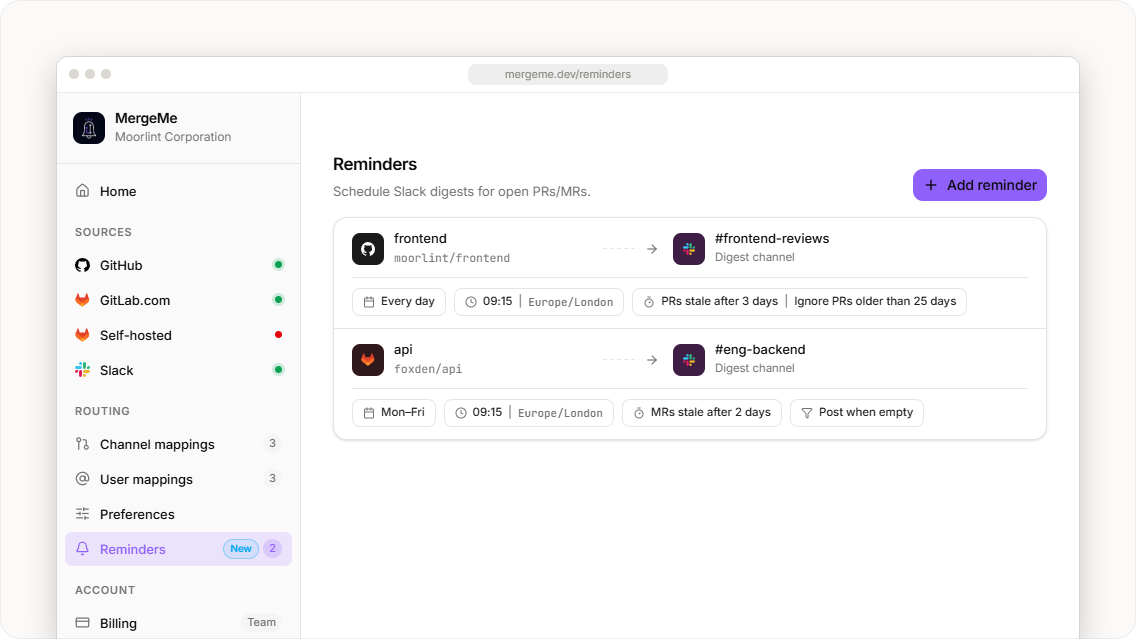
- Open Routing → Reminders in the dashboard.
- Click Add reminder.
- Choose one or more repositories or projects. GitHub repos and GitLab projects can sit in the same reminder.
- Pick the Slack channel for the digest.
- Set the schedule: timezone, weekdays, and a time on the hour or at :15, :30, or :45.
- Set PRs/MRs stale after (in days) and any optional filters.
- Save.
Owners and admins can create and edit reminders. Members can view them.
Defaults for a new reminder
| Setting | Default | What it does |
|---|---|---|
| Schedule | 09:00, Monday to Friday, your browser timezone | When the digest runs |
| PRs/MRs stale after | 2 days | Minimum age to appear in the digest |
| Ignore PRs/MRs older than | Off | Skips very old requests so an abandoned PR does not show up forever |
| Skip draft PRs/MRs | On | Drafts and WIP merge requests stay out of the digest |
| Respect excluded usernames | On | Uses the bot blocklist from Routing → Preferences |
| Post even when there are no matches | Off | When on, posts a short all-clear message instead of staying silent |
The excluded usernames list is the same one that keeps Dependabot or Renovate out of your live cards. See how to control when PR/MR cards post to Slack for how that list works.
Stop GitHub PRs and GitLab MRs from going quiet withscheduled stale reminders from MergeMe
Start freeReminder playbooks that work
The feature is simple. The value comes from choosing the right schedule and threshold for each audience.
Daily standup nudge
- Repos: everything the squad owns, GitHub and GitLab together
- Channel: the squad channel, for example
#payments-team - Schedule: weekdays, 15 minutes before standup
- Stale after: 1 or 2 days
The digest becomes the first thing people see before standup, so "who can pick this up?" gets answered in the meeting.
Weekly lead review
- Repos: all repos across several squads (Team plan allows up to 25 per reminder)
- Channel: a private leads channel
- Schedule: Monday morning
- Stale after: 5 days, ignoring anything older than 30 days
This surfaces work that slipped through squad-level reminders without listing abandoned branches.
All-clear for quiet repos
- Repos: a library or infrastructure repo with low traffic
- Post even when there are no matches: on
An explicit "No open MRs matched this reminder." tells the owner the repo was checked, not forgotten.
Which git sources reminders can scan
Reminders need API access to list open PRs and MRs, not just incoming webhooks.
| Git source | Reminders supported | Why |
|---|---|---|
| GitHub.com | Yes | Lists open PRs through the GitHub App |
| GitLab.com | Yes | Lists open MRs through the OAuth connection |
| GitLab self-hosted (Application mode) | Yes | Lists open MRs through the GitLab Application connection |
| GitLab self-hosted (manual webhooks) | No | MergeMe has no API token to list merge requests on your instance |
If your self-hosted GitLab uses manual webhooks today and you want reminders, the self-hosted GitLab setup guide explains the Application option. Switching method resets self-hosted mappings, so plan it as a deliberate change.
Official Slack apps vs MergeMe reminders
| Official GitHub / GitLab Slack apps | MergeMe | |
|---|---|---|
| Messages per PR/MR | New message for every event | One card, updated in place |
| Scheduled digest of stale PRs/MRs | Varies by app and plan | Yes, per reminder: repos, channel, timezone, weekdays |
| GitHub and GitLab in one digest | No | Yes |
| Skip drafts and bot accounts | Varies | Yes, drafts skipped and excluded usernames respected by default |
| Self-hosted GitLab | Limited / varies | Yes, in Application mode |
FAQ
Does MergeMe send reminders for stale pull requests and merge requests?
Yes. Under Routing → Reminders, each reminder posts a scheduled Slack digest of open GitHub PRs and GitLab MRs older than the threshold you set.
Do reminders need a channel mapping?
No. Reminders are independent of channel mappings. You can include a repo in a reminder without mapping it, and the digest can go to a different channel from the live PR/MR cards.
Does the reminder reply in the PR/MR thread?
No. The digest is a new channel message with links to each PR or MR. Existing cards and their threads are not changed.
Do reminders work with self-hosted GitLab?
Yes, when self-hosted GitLab is connected in Application mode. Manual webhook setups cannot be scanned because MergeMe has no API token to list open merge requests on that instance.
What happens if I change the time after today's reminder has posted?
Nothing extra that day. Each reminder runs once per local calendar day, so the new time takes effect on the next scheduled weekday.
How many reminders do I get for free?
The Hobby plan includes 1 reminder with 1 repo. The Team plan (from £5 per developer seat per month, 5-seat minimum) raises the limits, with up to 25 repos per reminder. See pricing.
Get started
- Reminders docs: schedule, filters, and limits
- Routing overview: channel mappings, user mappings, and preferences
- Start free: connect GitHub, GitLab, and Slack in about five minutes
Set the threshold, pick the channel, and let the digest ask "who is reviewing this?" so nobody has to.