- Published on
GitHub Slack App Comparison: Mixed GitHub and GitLab Teams
- Authors

- Name
- Maruan
GitHub-only team? Start with the official GitHub Slack app. It supports threaded notifications, updating parent cards and scheduled review reminders.
Using GitHub and GitLab together changes the decision. This comparison focuses on whether separate native integrations or a shared PR/MR workflow fits your team.
What the official GitHub Slack app does well
The official GitHub Slack app works well for single-host teams. GitHub builds and maintains it, and it covers the standard notification needs of repositories on GitHub.com with no third-party licensing cost.
After installing the app and connecting your account, subscribe a channel to a repository:
/github subscribe owner/repoIts documented features include:
An updating parent card with PR activity in its thread.
Slack mentions after linking your GitHub identity.
Scheduled reminders for pending reviews.
See the official GitHub Slack documentation for permissions and configuration.
For teams working purely on GitHub, this covers daily communication needs. It needs little administrative oversight, follows GitHub permissions out of the box, and respects organization security boundaries. It also keeps pace with new GitHub platform features. When all your code lives in one place and your team only reviews GitHub pull requests, the native integration is a reliable, free baseline.
Where a mixed GitHub/GitLab setup changes the question
The limits of the official GitHub Slack app show up the moment a team adds GitLab. The app talks only to GitHub. It can't read GitLab webhooks, parse GitLab merge requests, or understand GitLab user identities.
When a team uses both systems, administrators install the official GitLab Slack integration next to the GitHub app. The day-to-day experience is fragmented. The GitHub integration posts structured messages with interactive buttons and comment threads. The GitLab integration uses a different message schema and often sends separate messages for new comments, pipeline updates, and review approvals. We cover the clutter problem in our guide on how to stop GitHub and GitLab Slack notification spam.
This split costs reviewers real attention. An engineer moving between a GitHub pull request and a GitLab merge request has to read two different notification layouts. Thread discussions scatter across channels or sink under high-volume bot alerts. A setup that worked fine for one host gets noisy and uncoordinated across two.
What MergeMe covers: one updating card per PR/MR across hosts
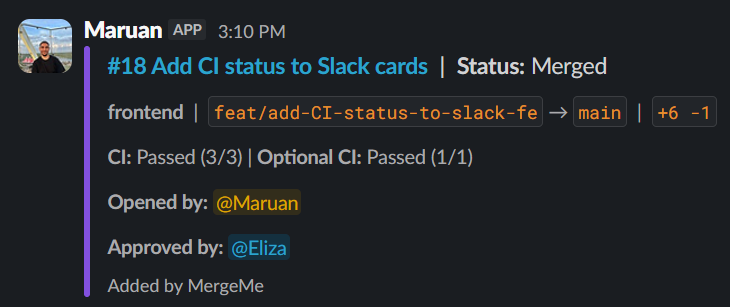
A MergeMe pull request card in Slack, shown after merging.
MergeMe treats GitHub pull requests and GitLab merge requests under one model. Instead of an endless stream of independent chat alerts, MergeMe provides Slack notifications for GitHub pull requests and GitLab merge requests, shown as one updating card per PR/MR.
That single card replaces the clutter. When an author opens a pull request on GitHub.com or a merge request on GitLab, MergeMe creates one card in the target Slack channel. As reviews arrive, changes get pushed, or approvals register, the card updates in place. Channel history stays clean, and reviewers can check the current state of a review without scrolling through dozens of disconnected bot replies. For channel organization, see our walkthrough on how to route GitHub repos and GitLab projects to the right Slack channels.
MergeMe supports GitHub.com, GitLab.com, and self-hosted GitLab in a single Slack workspace. Engineering managers don't maintain separate bot configurations or ask their teams to read competing message formats. Both platforms report into Slack through the same self-updating cards.
When the official GitHub Slack app is enough
Keep the official app when:
Your active repositories are on GitHub.
Its notification threads and scheduled reminders meet your needs.
You do not need GitLab merge requests in the same workflow.
Test your actual channel settings before evaluating another tool. The official integration may already do the job.
When supported mixed-host coordination is worth considering
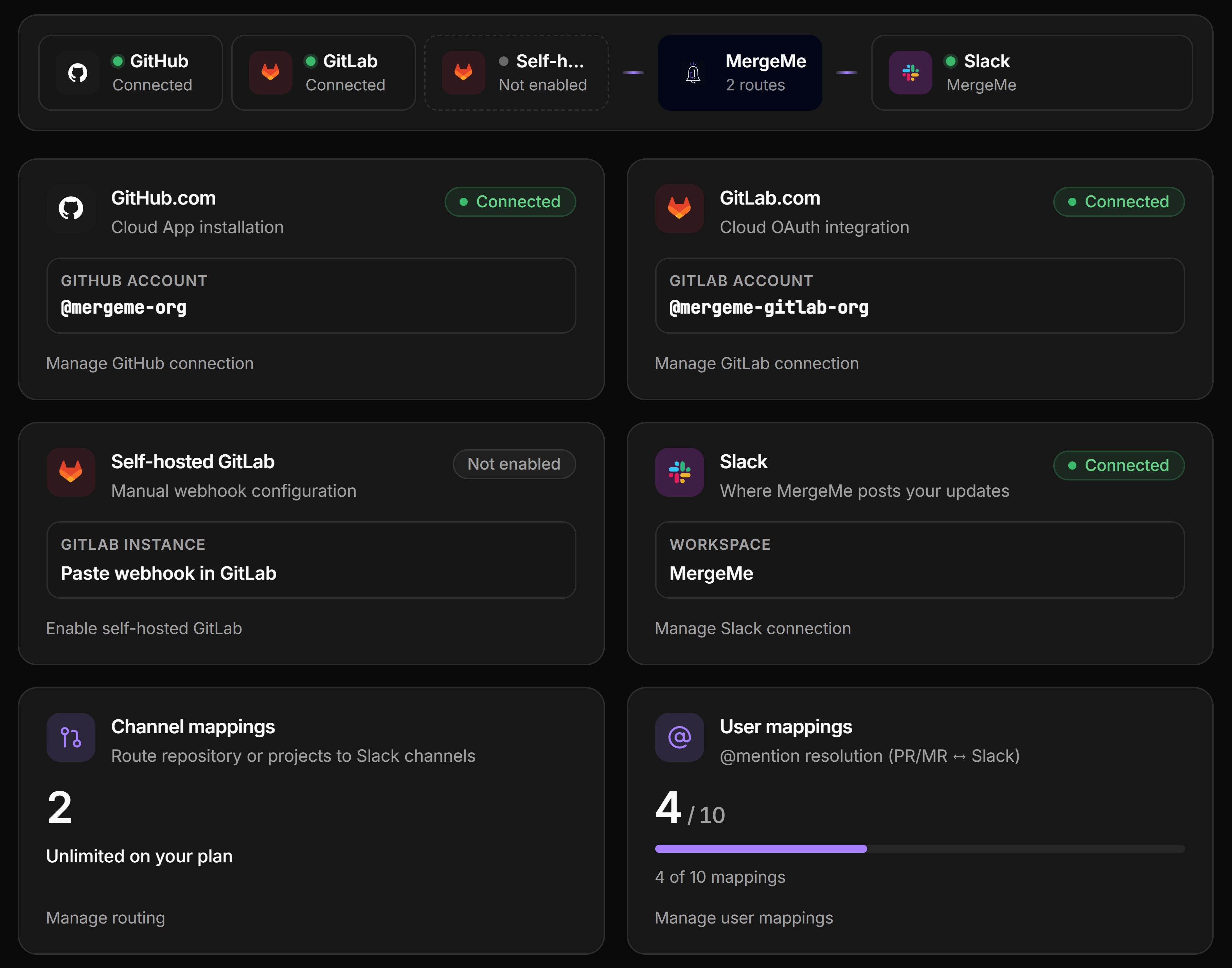
MergeMe’s integrations screen for connecting code hosts.
Consider a shared workflow when:
Reviewers work across GitHub.com and GitLab.com or self-hosted GitLab.
Different notification formats make requests harder to follow.
You want to evaluate a consistent card format across both hosts.
Try it in a review channel and judge whether your team finds the cards useful. Compatibility alone does not establish that switching will improve your process.
Plans, setup effort and self-hosting: what to check before you decide
Before committing your workspace, look closely at licensing cost, configuration scope, and hosting model.
The official GitHub Slack app costs nothing beyond your existing GitHub subscription. Setup takes minutes: install the app from the Slack App Directory, authenticate your GitHub account, and run subscription commands in your channels. It can't connect to GitLab under any circumstances.
MergeMe offers tiers based on team size. A free tier is available so small teams can try the multi-host experience at no cost. For enterprises with strict data residency, internal governance, or custom SSO requirements, self-hosting is available by enquiry. Teams with these needs can run MergeMe on their own servers by contacting hello@mergeme.dev.
Check your internal compliance boundaries. If your security policy bars third-party cloud tools from parsing self-hosted GitLab code review metadata, a self-hosted deployment may decide the question for you.
A short decision checklist for your team
Use this checklist to pick the right notification setup for your engineering organization:
Do all engineering teams host repositories strictly on GitHub.com? If yes, the official GitHub Slack app meets your requirements without extra software.
Does your organization run GitLab.com or self-hosted GitLab alongside GitHub? If yes, native tools will produce disjointed notification streams from separate bots.
Does your team struggle with channel noise from multiple bot notifications per pull request? If duplicate messages make reviews harder to follow, a single updating card fixes it.
Does your organization enforce data residency rules that require running integrations on self-hosted infrastructure? If so, verify whether your chosen notification tool supports self-hosting.
Will your team grow beyond basic channel setups? If you need unified notifications across multiple repositories on both hosts, decide whether managing two separate native bots is worth the ongoing admin time.
Conclusion
Choose based on your team’s code hosts and review workflow. GitHub-only teams can start with the official app; mixed GitHub/GitLab teams can evaluate MergeMe’s updating cards.
Try MergeMe on the free Hobby plan, which includes one channel mapping and five user mappings.
FAQs
Can the official GitHub Slack app connect to GitLab repositories?
No. The official GitHub Slack app integrates exclusively with GitHub.com. It cannot process GitLab webhooks, track GitLab merge requests, or monitor projects on GitLab.com or self-hosted GitLab.
How does MergeMe handle notifications differently from native git Slack apps?
MergeMe presents notifications for GitHub pull requests and GitLab merge requests as a single updating card per PR/MR. Rather than posting new messages for each review event, the card updates in place within Slack.
Does MergeMe support self-hosted GitLab instances?
Yes. MergeMe supports GitHub.com, GitLab.com, and self-hosted GitLab within a single Slack workspace. Teams with specific data residency or SSO requirements can also run MergeMe on their own infrastructure by contacting hello@mergeme.dev.
What is the pricing difference between the official GitHub Slack app and MergeMe?
The official GitHub Slack app is free to install and use, though a GitHub account is required, Copilot-powered features may require an eligible Copilot plan, and separate Slack subscription costs may apply. MergeMe provides a free Hobby tier offering 1 channel mapping and 5 user mappings, a Team tier at £5 per dev seat monthly, and self-hosting options available by enquiry.